This official feed from the Google Workspace team provides essential information about new features and improvements for Google Workspace customers.


What’s changing 

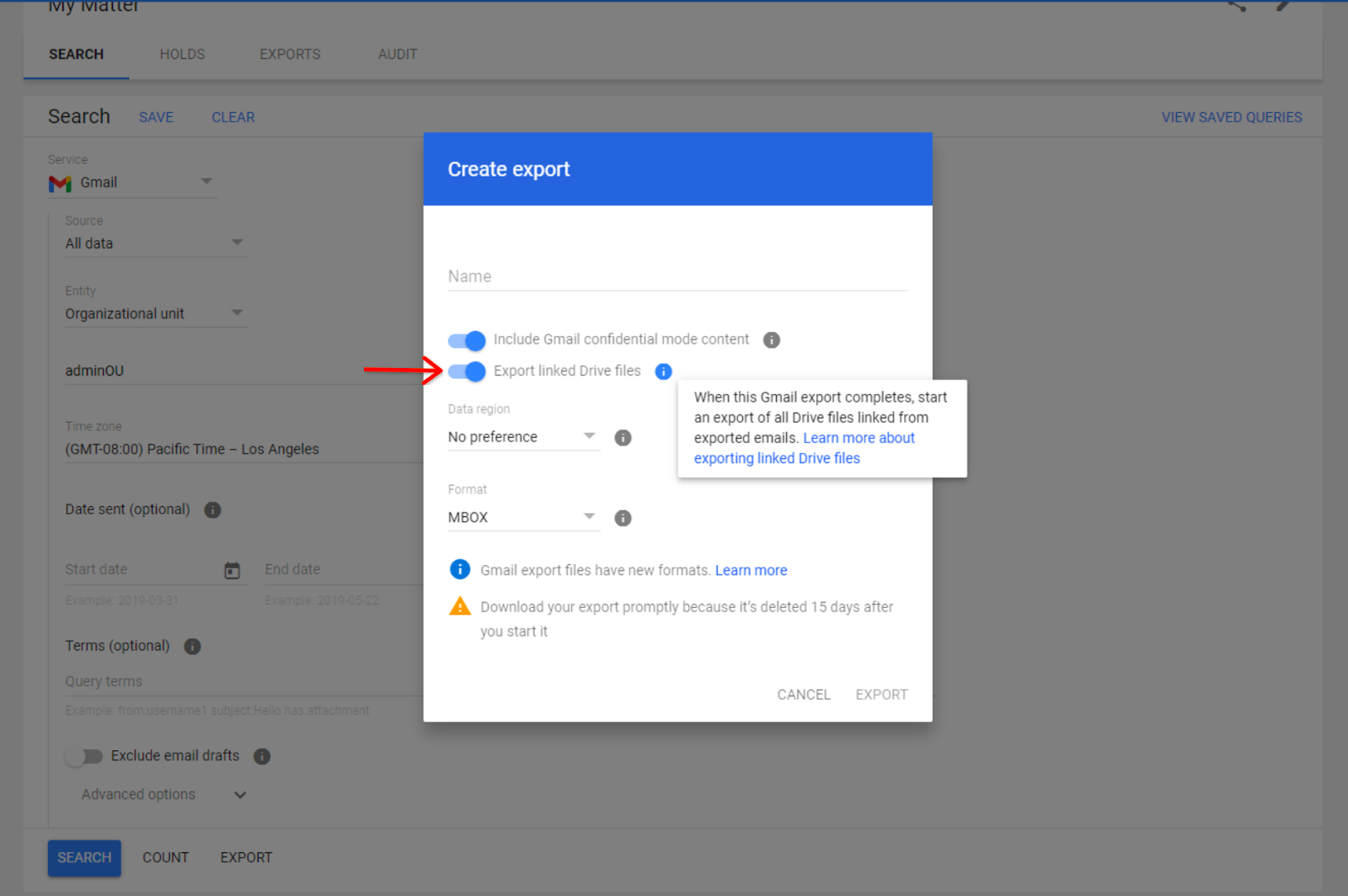
Starting December 8, 2023, admins can export Drive files hyperlinked in Gmail messages directly in Google Vault. When admins select “export linked Drive files”, Vault will look for Drive hyperlinks in the body of the emails being exported from Gmail. If Drive hyperlinks are found, a separate export of Drive files will also be created.


Toggle “Export linked Drive files” on or off


In the “Exports” tab, Drive exports will be grouped with their corresponding Gmail export — you can select the arrow icon to open the collapsible menu.


Admins will be able to find their exported hyperlinked Drive content nested under the corresponding Gmail export in the “Export” tab. Vault admins can find the association between the Gmail export and Drive link export in the export file names and metadata. 


Who’s impacted 

Admins 


Why it matters 

Vault is critical for retaining, holding, searching, and exporting users’ Google Workspace data. This update reduces the need for admins to manually find and extract Drive files hyperlinked in Gmail messages. 

Getting started 


Rollout pace 

Vault user interface updates 
API updates 

Availability 

  • Available to Google Workspace Business Plus, Enterprise Essentials, Enterprise Essentials Plus, Enterprise Standard, Enterprise Plus, Education Standard, Education Plus customers or customers with the Vault add-on license

Resources 

What’s changing

Building upon the recently announced improved search results in Google Chat, we’re also upgrading the search results page to help you find the right message, file, or space in Chat. 

Specifically, Chat will now highlight matching keywords in search results and show clear demarcation between results for easier browsing. The highlighted keywords could be an exact match to your search query or terms that are related to your search query. 
Introducing a redesigned search results page in Google Chat


Who’s impacted 

End users 


Why it matters 

This update improves content discoverability by making it easier for you to browse and locate search results quickly in Chat. 


Additional details 

Search results are based on the exact query, as well as any additional queries that might have been triggered (secondary query, synonyms, spell corrections, etc). 


Getting started 


Rollout pace 

  • This feature is available now for all users on web and mobile


Availability 

  • Available to all Google Workspace customers and users with personal Google Accounts 

Resources 

What’s changing

For years, users have written content and replied to comments faster and more easily using Smart Compose in Google Docs, Slides, Sheets and Drawings. Today, we’re excited to announce a new feature that extends the power of Smart Compose to help you solve simple math equations. 

Upon typing a math equation that ends with “=” into your document, presentation, spreadsheet comments, or drawing, solutions will appear as grey text suggestions. This new seamless mathematical experience will increase productivity and accuracy when solving math equations across Workspace. 
Solve math equations easily with Smart Compose


Getting started 

  • Admins: There is no admin control for this feature. 
  • End users: This feature will be ON by default and can be disabled by opening a file, clicking Tools > Preferences > deselect “Show Smart Compose suggestions”. Visit the Help Center to learn more about using Smart Compose and Smart Reply. 

Rollout pace 

Availability 

  • Available to Google Workspace Business Starter, Business Standard, Business Plus, Essentials Starter, Enterprise Essentials, Enterprise Essentials Plus, Enterprise Standard, Enterprise Plus, Education Fundamentals, Education Standard, Education Plus, the Teaching and Learning Upgrade, and Nonprofits 

Resources 

What’s changing

We’re excited to announce the general availability of an improved Google Vault audit log experience. As a result of this change, you can now find Vault audit logs in the Admin console alongside other Google Workspace apps like Gmail, Google Drive, and more. Beginning in January, Vault audit logs can be accessed by the Reports API, which you can use to actively monitor your domain’s Vault usage. We’ll share more information here on the Workspace Updates blog when this functionality becomes available.

Aligning the location and functionality of Vault audit logs with other Workspace apps creates a consistent experience for admins and reduces the need to search for information in various locations. It also enables audit logs in the admin console to be compliant with our new regionalized data processing capabilities.

Additional details

The duration, access and visibility of Vault audit logs will remain the same and will continue to require the “manage audits” permission. The Vault audit logs can be accessed through the Vault reports and matter audits links as well as from the Admin Console. Visit the Help Center to learn more about setting up Vault privileges.


Getting started

  • Admins: Visit the Help Center to learn more about Vault log events.
  • End users: There is no end user impact or action required.


Rollout pace


Availability


  • Available to Google Workspace Business Plus, Enterprise Essentials, Enterprise Essentials Plus, Enterprise Standard, Enterprise Plus, Education Standard, Education Plus customers or customers with the Vault add-on license

Resources


3 New updates

Unless otherwise indicated, the features below are available to all Google Workspace customers, and are fully launched or in the process of rolling out. Rollouts should take no more than 15 business days to complete if launching to both Rapid and Scheduled Release at the same time. If not, each stage of rollout should take no more than 15 business days to complete.


New ways to use the Google Sheets app on iOS devices 
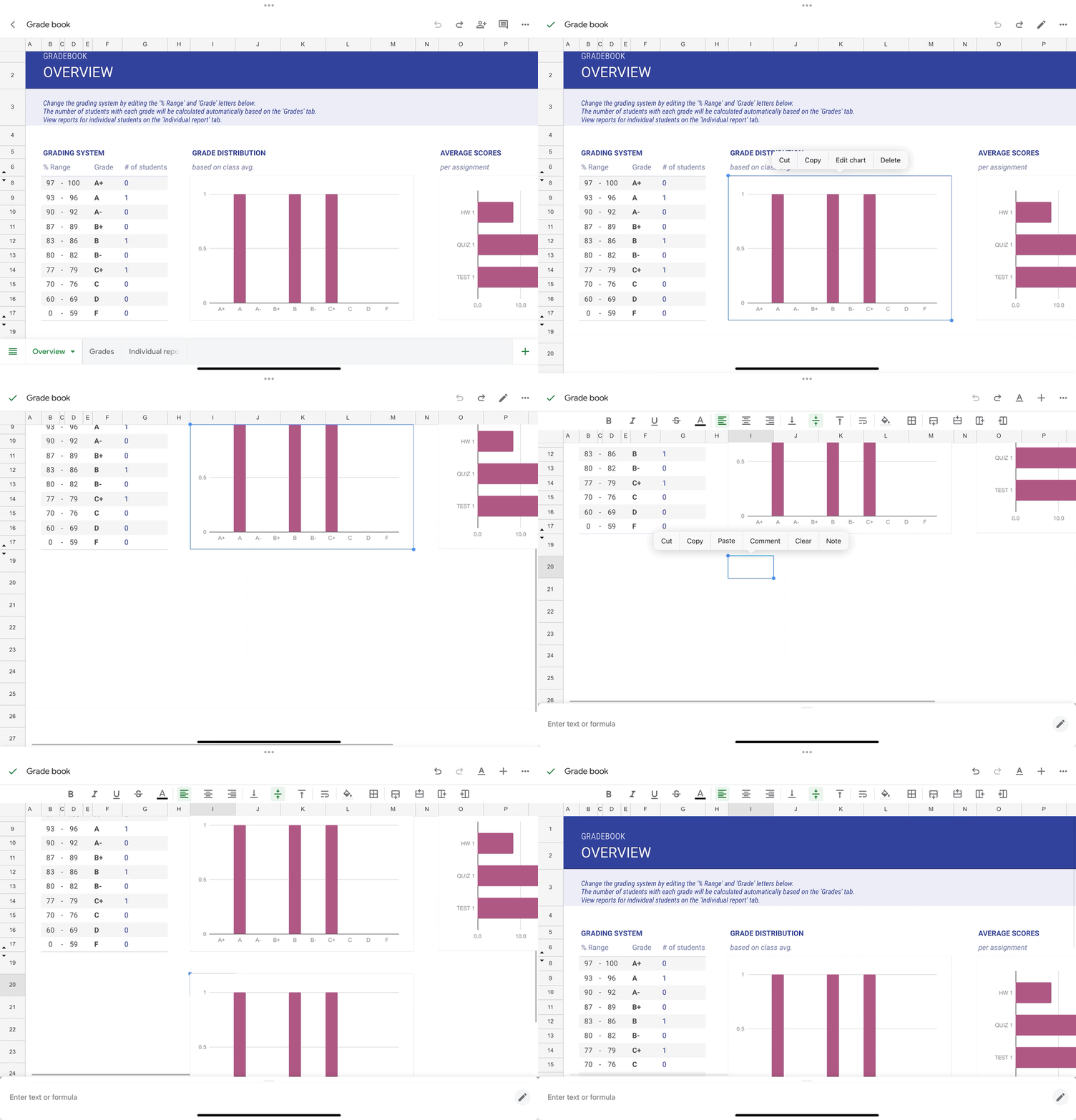
You can now copy charts from the Google Sheets app on all iOS devices and paste them externally as images or within the same spreadsheet as a duplicate chart. In addition, you can modify text formatting using the contextual toolbar in Sheets when a keyboard is attached to iOS tablets. | Rolling out to Rapid Release and Scheduled Release domains now. | Available to all Google Workspace customers and users with personal Google Accounts. | Learn more about adding & editing a chart or graph and editing & formatting a spreadsheet. 
New ways to use the Google Sheets app on iOS devices


Adding ‘Admin managed apps’ category to Google Workspace Marketplace
We’re excited to announce a new featured app category in the Marketplace: Admin managed. These Enterprise apps can be installed only by a Google Workspace administrator for their organization. | Available now to all Google Workspace customers. | Learn more about Featured app categories. 


Bulk select in Gmail on Android and iOS devices 
We’re introducing a feature that enables you to bulk select a batch of messages in the email threadlist with one tap using the Gmail app on Android and iOS devices. After clicking the select all icon, a batch of messages will be selected, enabling you to easily perform email actions such as deleting multiple messages or marking them as “read”. | This feature is available now on Android devices and is rolling out now to Rapid Release and Scheduled Release domains on iOS devices. | Available to all Google Workspace customers and users with personal Google Accounts. 
Bulk select in Gmail on Android and iOS devices


Previous announcements

The announcements below were published on the Workspace Updates blog earlier this week. Please refer to the original blog posts for complete details.


Create shareable video presentations in Google Slides 
We’re introducing slides recordings, a new Google Slides feature that lets you easily record yourself presenting, and then share the presentation with others to view when it works for them. | Available to Google Workspace Business Standard, Business Plus, Enterprise Starter, Enterprise Essentials, Enterprise Essentials Plus, Enterprise Standard, Enterprise Plus and Education Plus only. | Learn more about slides recordings. 

The next evolution of automated data entry in Google Sheets 
Enhanced Smart Fill in Google Sheets is available for customers with the Duet AI for Google Workspace Enterprise add-on. | Learn more about enhanced smart fill. 

Expanding message bubbles in Google Chat to iOS devices 
In September, we introduced message bubbles in Google Chat on web and Android, enabling users to more easily differentiate incoming versus outgoing messages in the Chat message stream. This week, we’re excited to announce the expansion of message bubbles to iOS devices. | Learn more about message bubbles. 

Updates to the Google Drive scanner on Android & iOS devices 
We’re introducing additional enhancements to the Drive scanner on Android devices, which now powers the Google Pixel camera and includes improvements to the scanner experience when capturing content. We’re also expanding the Google Drive scanner and title suggestion feature to iOS devices. | Learn more about Drive scanner. 

Introducing a new homepage view in Google Drive 
We’ve added a new streamlined homepage for Drive called Home that makes it easier and faster for you to find files that matter most. | Learn more about Drive home. 

Introducing a new mobile experience for Google Chat 
We recently announced a streamlined user experience in Google Chat to help you find what you need much faster, including new features like home and mentions. Starting today, we’re excited to introduce a new bottom navigation bar within the Chat app on Android & iOS devices to help you easily access these features on mobile. | Learn more about the Chat mobile experience. 

Google Vault now supports Google Calendar 
Google Vault now supports Calendar, which means customers can take new actions around Calendar data. | Available to Google Workspace Business Plus, Enterprise Essentials, Enterprise Essentials Plus, Enterprise Standard, Enterprise Plus, Education Standard, Education Plus customers or customers with the Vault add-on license only. | Learn more about Vault supporting Calendar. 

More insights to help admins troubleshoot Google Meet hardware issues 
In 2022, we introduced several improvements for managing Google Meet hardware devices. These improvements included surfacing additional information about device issues, such as a description of the issue, when the issue was detected, and more. Now, we’re taking these improvements one step further by providing admins with even more data points. | Learn more about Google Meet hardware issues. 

Monitor insider risk of Google Workspace data with Chronicle 
Admins can now more seamlessly integrate their Google Workspace data with Chronicle (Google’s cloud-native Security Operations platform), to quickly detect, investigate and take action on risky activity and threats. | Available to Google Workspace Enterprise Standard and Enterprise Plus customers only. | Learn more about Chronicle. 

Google Classroom now supports roster import from SIS partners
Educators can now easily import students from their student information system (SIS) to Google Classroom using OneRoster. This integration saves educators time and helps make class setup much quicker. | Available to Education Plus and the Teaching and Learning Upgrade only. | Learn more about roster import. 

Completed rollouts

The features below completed their rollouts to Rapid Release domains, Scheduled Release domains, or both. Please refer to the original blog posts for additional details.


Rapid Release Domains: 
Scheduled Release Domains: 
Rapid and Scheduled Release Domains: 


For a recap of announcements in the past six months, check out What’s new in Google Workspace (recent releases).