You can now transfer data from one user to another in the Google Admin Android app, much like you can in the web-based Admin console. The process can be initiated from the User List page or the User Details page and can be done as a standalone action, before suspending a user, or before deleting a user. Just like on the web, you can transfer Google Drive files and Google+ pages. For more detailed instructions, please visit the Help Center.
Launch Details Release track: Launching to both Rapid release and Scheduled release
In October 2015, we introduced the ability to manage company-owned devices running Android 6.0 (Marshmallow). That launch included several new settings, including device lockdowns, account management, sharing freedom, application management, and factory reset protection. Today, we’re going even further to make it easy to manage your company-owned Android devices.
First, you can now bulk enroll your Android inventory and deploy it to remote offices with your chosen settings enforced. Moreover, during the bulk import process, you can now associate your company-owned devices with a new attribute called an asset tag to better integrate with internal tracking and billing tools.
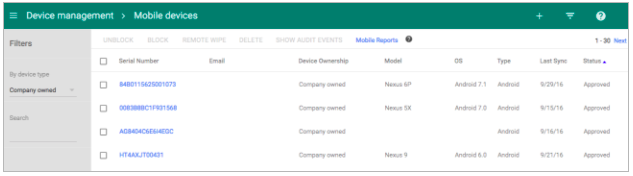
Second, the mobile inventory page in the Admin console (Device management > Mobile devices) now features improved filtering around device ownership and device actions, like blocking and wiping.
Finally, all admin activities around the management of company-owned devices—like bulk import and device actions—are now logged in the Admin Audit section of the Admin console (Reports > Audit > Admin), while all end user activities on company-owned devices—like OS updates, setting changes, and app installs and removals—are now tracked in Mobile Audit (Reports > Audit > Mobile Devices). Most importantly, you can now choose to receive a monthly report to help you monitor company-owned devices that have been inactive in the last 30 days.
Support for company-owned devices is provided to G Suite Business customers only. For more information, check out the Help Center.
Launch Details Release track: Launching to both Rapid release and Scheduled release
Editions: Available to G Suite Business customers only
Rollout pace: Gradual rollout (potentially longer than 3 days for feature visibility)
Today, we’re announcing that on January 1, 2017 we will discontinue support for the Google Drive desktop app on Windows XP and Vista since these platforms are no longer actively supported by Microsoft. The Google Drive desktop app (officially: "Google Drive for Mac/PC") will continue to function on these platforms, but will not be actively tested and maintained. If you are still on one of these unsupported platforms, we encourage you to move to a newer version of Windows to continue using Google Drive desktop app.
Release track: Launching to both Rapid release and Scheduled release on January 1, 2017
Bringing the right team together for a meeting or brainstorm can take an idea from being good to great. When we tap into ideas from teams across the globe, our work becomes more collaborative and productive. It doesn’t feel like...well, work. At Google, we’ve set out to redefine meetings. So today, we’re introducing Jamboard — a collaborative, digital whiteboard that makes it easy for your team to share ideas in real-time and create without boundaries. We’re moving the whiteboard to the cloud.
Your team’s collaborative, cloud-first whiteboard Jamboard raises the bar on collaborative creativity, bringing the same real-time collaboration found in G Suite, combined with the best of the web, to your team’s brainstorms and meetings. You can work with teammates from across the world on other Jamboards or remotely use the smartphone or tablet companion app.
Jamboard makes it easy to enrich your brainstorm with the power of Google Search and your team’s work in G Suite. Grab images and content from the web and bring them straight into your “jam.” Pull in work from Docs, Sheets and Slides, or add photos stored in Drive. To capture your ideas clearly, Jamboard is packed with tools like sticky notes and stencils as well as intelligent features like handwriting and shape recognition.
It’s a hassle when you use a whiteboard, reach the end of your meeting and have to quickly scramble to snap a picture of your work. How many times have you scribbled “do not erase” above your idea? Jamboard lets you take your work with you. When you “jam” with your colleagues, it lives in the cloud in Google Drive, so you can easily share what you’ve created or come back to iterate at anytime. Your brainstorm doesn’t have to end when the meeting does.
Designed for precision and ease Jamboard is intelligently designed to speed up collaboration among your teams with a 55-inch 4k display that features a best-in-class touch response time. Combine this with a built-in HD camera, speakers and Wi-Fi, and you’re set up to collaborate and broadcast your work globally with Hangouts.
Jamboard’s touchscreen was built for precision drawing. It automatically recognizes the difference between using the stylus to sketch or the eraser to start over, and neither require batteries or pairing. Jamboard can also sense when you’re using your finger to wipe work off of the screen, just like a classic whiteboard (except you won’t get ink on your hand). The intuitive, single-cable setup makes it easy to start creating quickly with Jamboard — just wheel it in, turn it on and start brainstorming.
Time to jam We want to help teams get back to the heart of what they love to do: create new ideas. That’s why we’ve worked closely with G Suite customers like Instrument, Netflix, and Spotify to refine the blend of hardware and software that drives Jamboard. We're also partnering with BenQ to tap into its network of channels and resellers to help bring Jamboard to market.
While touch displays have traditionally been expensive, at under $6,000 USD, Jamboard is a competitively-priced way to transform your team’s meetings and will be available for purchase in 2017. As we “jam” on the final product details, we're ready to partner with a broader set of G Suite customers to perfect Jamboard through an Early Adopter Program. If you're interested, submit the form on the Jamboard website to receive more information about eligibility.
You have long been able to add, edit, and view various details about a user in the Admin console, from basic information like name and email address to workplace-focused data like job title, manager, and department. Using the Admin SDK or Google Cloud Directory Sync tool, you could also add custom user attributes to that pre-defined list. Starting today, you can create and view these custom user attributes directly from the Admin console interface; there’s no need to employ the Admin SDK or GCDS.
For example, you can track the projects an employee is working on or store their hire date—whatever meets your organization’s needs. Moreover, you can determine what type of data should populate each field (e.g. text, numbers, dates, email addresses, etc.) and who can see that data—admins and the individual user only, or all users in your organization. You can then edit and view these details on the User Details page in the Admin console.
For more information on how to add and manage custom user attributes, check out the Help Center.
Launch Details Release track: Launching to both Rapid release and Scheduled release
In the Google Cloud Community, discuss the latest features with Googlers and other Google Workspace admins like you. Learn tips and tricks that will make your work and life easier. Be the first to know what's happening with Google Workspace.
On the “What’s new in Google Workspace?” Help Center page, learn about new products and features launching in Google Workspace, including smaller changes that haven’t been announced on the Google Workspace Updates blog.
Discover how a diverse range of organizations, from small businesses and nimble startups to globally recognized Fortune 500 corporations, leverage the collaborative power of Google Workspace. Explore examples of how teams of are streamlining workflows and driving productivity by utilizing Google-Workspace.