This official feed from the Google Workspace team provides essential information about new features and improvements for Google Workspace customers.


What’s changing 

We’re making it easier for you to indicate your availability in Google Voice on web and mobile. Previously, you could only indicate your availability for all of your ring groups. 

This update gives you greater flexibility to manage your Ring Group availability in Google Voice, without the need to sign-out of Voice or block all incoming calls using “Do Not Disturb”. 

You can now customize your availability for the following: 
  • All calls. 
  • Direct calls: if unavailable, calls will be sent to voicemail. 
  • Calls from specific ring groups: if one or more ring group lines are unavailable, calls will be forwarded to the next available member of the group.


Getting started


Rollout pace

Availability

  • Available to Google Voice Standard and Premier customers

Resources


3 New updates

Unless otherwise indicated, the features below are fully launched or in the process of rolling out (rollouts should take no more than 15 business days to complete), launching to both Rapid and Scheduled Release at the same time (if not, each stage of rollout should take no more than 15 business days to complete), and available to all Google Workspace and G Suite customers.


Improving Filters in Google Sheets
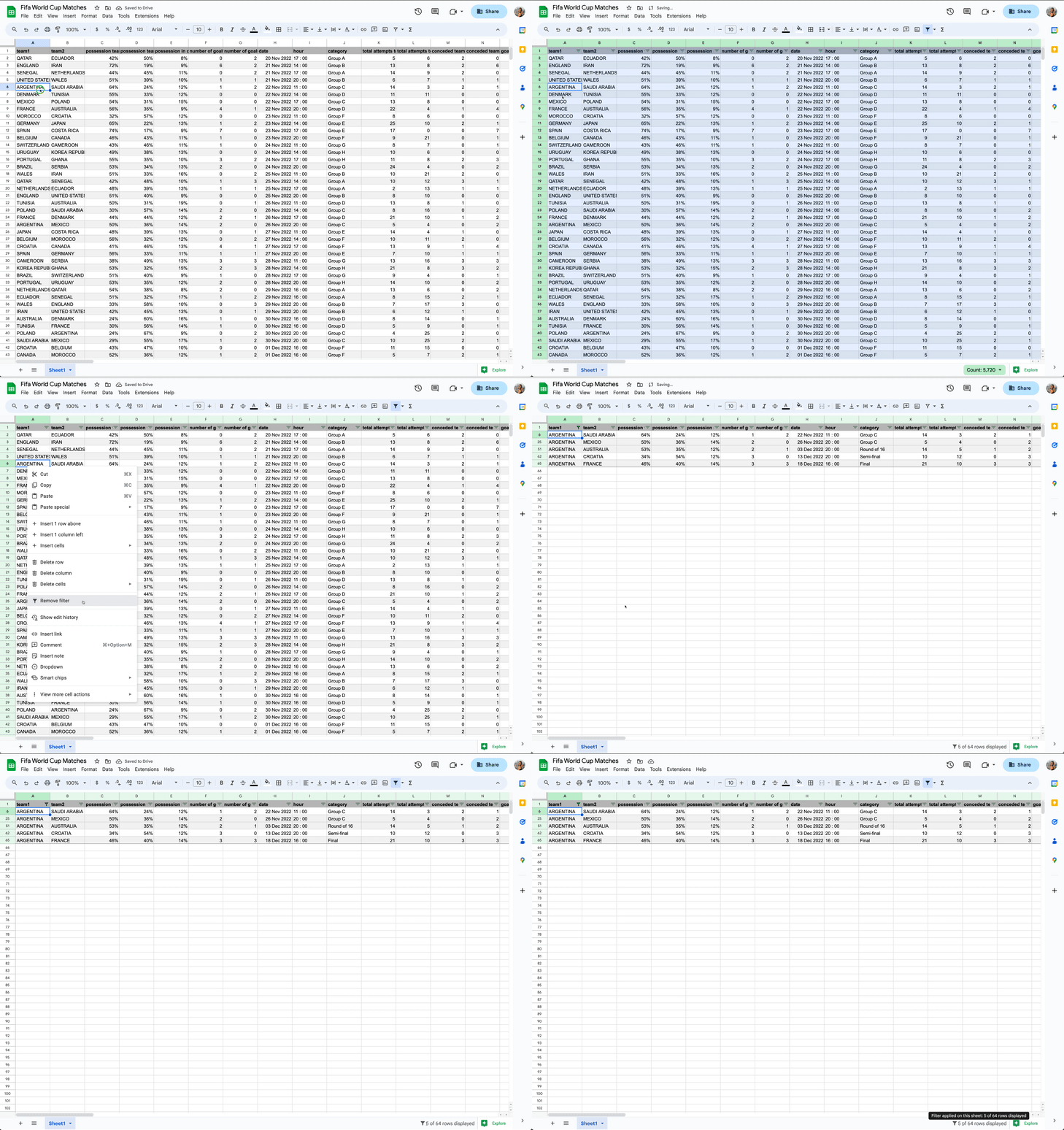
Filters and filter views help you analyze a set of data in a spreadsheet, and to improve upon this widely used feature, we’re introducing two updates. First, there will be a summary of the rows remaining after a filter is applied in Sheets. You will now see the number of rows that are displayed in the bottom right margin, helping you know immediately whether you are looking at the entire data set or just a subset of it. Second, with the new option to directly apply filters from the right-click menu, filters are now more accessible and discoverable. Simply right-click and apply filters directly to your data, remove them, or filter by the current cell value from the same menu. | Rolling out to Rapid Release domains now; launch to Scheduled Release domains planned for March 15th, 2023 | Learn more.
Programmatically manage and apply Google Drive label taxonomy changes
In 2022, we announced a highly requested update that allows admins and developers to programmatically manage labels at scale through Google Drive APIs. As a follow up, the Drive Labels API now supports taxonomy management, enabling admins and developers to programmatically add, modify, delete, and publish label taxonomy changes. | This is now available to Google Workspace Essentials, Business Standard, Business Plus, Enterprise Essentials, Enterprise Standard, Enterprise Plus, Education Plus, Education Standard, and Nonprofits customers only. | Learn more


Expanding noise cancellation to phone participants
For select Google Workspace editions, participants who dial in by phone will have background noise removed from their audio. This helps ensure phone participants are easier to hear and understand during meetings, while removing any potential disturbing sound from the meeting. | This is now available to Business Standard, Business Plus, Enterprise Essentials, Enterprise Standard, Enterprise Plus, Education Plus, the Teaching and Learning Upgrade, and Frontline customers only. | Learn more 


Previous announcements

The announcements below were published on the Workspace Updates blog earlier this week. Please refer to the original blog posts for complete details.


Save time with suggested work locations in Google Calendar
We added an update that helps you easily define your work location much quicker with suggested working locations based on your recent locations. | Available to Google Workspace Business Standard, Business Plus, Enterprise Standard, Enterprise Plus, Education Fundamentals, Education Plus, Education Standard, Teaching & Learning Upgrade, and Nonprofits, as well as legacy G Suite Business customers only. | Learn more.


All newly created spaces in Google Chat will be in-line threaded beginning March 13, 2023
As previously announced, we’re streamlining the way you organize conversations in Google Chat. Starting March 13, 2023, all newly created spaces in Google Chat will be in-line threaded. Users will no longer have the option to organize them by conversation topic, where related messages and replies were grouped together in the main conversation window. Existing spaces organized by conversation topic will continue to function as they do today. | Learn more


Expanding noise cancellation in Google Meet to more devices
Beginning today, noise cancellation is available for users with personal Google Accounts on a wider variety of Android mobile devices, and for Google Workspace Business Starter, Education Fundamentals, Education Standard customers. It is also enabled by default for third-party devices that connect to Meet using Pexip. | Learn more


Client-side encryption for Gmail is now generally available
Beginning today, client-side encryption for Gmail is now generally available for Google Workspace Enterprise Plus, Education Plus, and Education Standard customers. For customers currently enrolled in the beta, your experience will not change. | Learn more.


Google Keep notes now available on home screen of Android devices
In addition to dual pane view, drag out, and a number of other features supporting the mission to provide a top-class user experience on Android devices when using Google Keep, we’re introducing the Keep single note widget. With this new feature, you can “pin” a note or list to your home screen and edit them in the Keep app with a single tap. | Learn more.  


Completed rollouts

The features below completed their rollouts to Rapid Release domainsScheduled Release domains, or both. Please refer to the original blog post for additional details.


Rapid and Scheduled Release Domains:


For a recap of announcements in the past six months, check out What’s new in Google Workspace (recent releases).

What’s changing

In addition to dual pane view, drag out, and a number of other features supporting the mission to provide a top-class user experience on Android devices when using Google Keep, we’re introducing the Keep single note widget. 

With this new feature, you can “pin” a note or list to your home screen and edit them in the Keep app with a single tap. Lists enable you to toggle checkboxes directly on the note without having to open the Keep app. Also, your notes and lists will reflect any background colors and reminders present within the Keep app. Finally, a collaborator icon will appear at the bottom of the note to indicate if it is a shared note between two or more people. 

By giving you quick and easy access to your most important notes and lists on your home screen, we hope this feature increases your productivity while using the Keep app. 

Getting started 

Rollout pace 

Availability 

  • Available to all Google Workspace customers, as well as legacy G Suite Basic and Business customers 
  • Available to users with personal Google Accounts 

Resources

What’s changing 

Beginning today, client-side encryption for Gmail is now generally available for Google Workspace Enterprise Plus, Education Plus, and Education Standard customers. For customers currently enrolled in the beta, your experience will not change. 


Workspace already encrypts data at rest and in transit by using secure-by-design cryptographic libraries. Client-side encryption takes existing encryption capabilities to the next level by ensuring that customers have sole control over their encryption keys—and thus complete control over access to their data. For more information, read the latest Workspace blog and our original beta announcement.

Getting started 

  • Admins
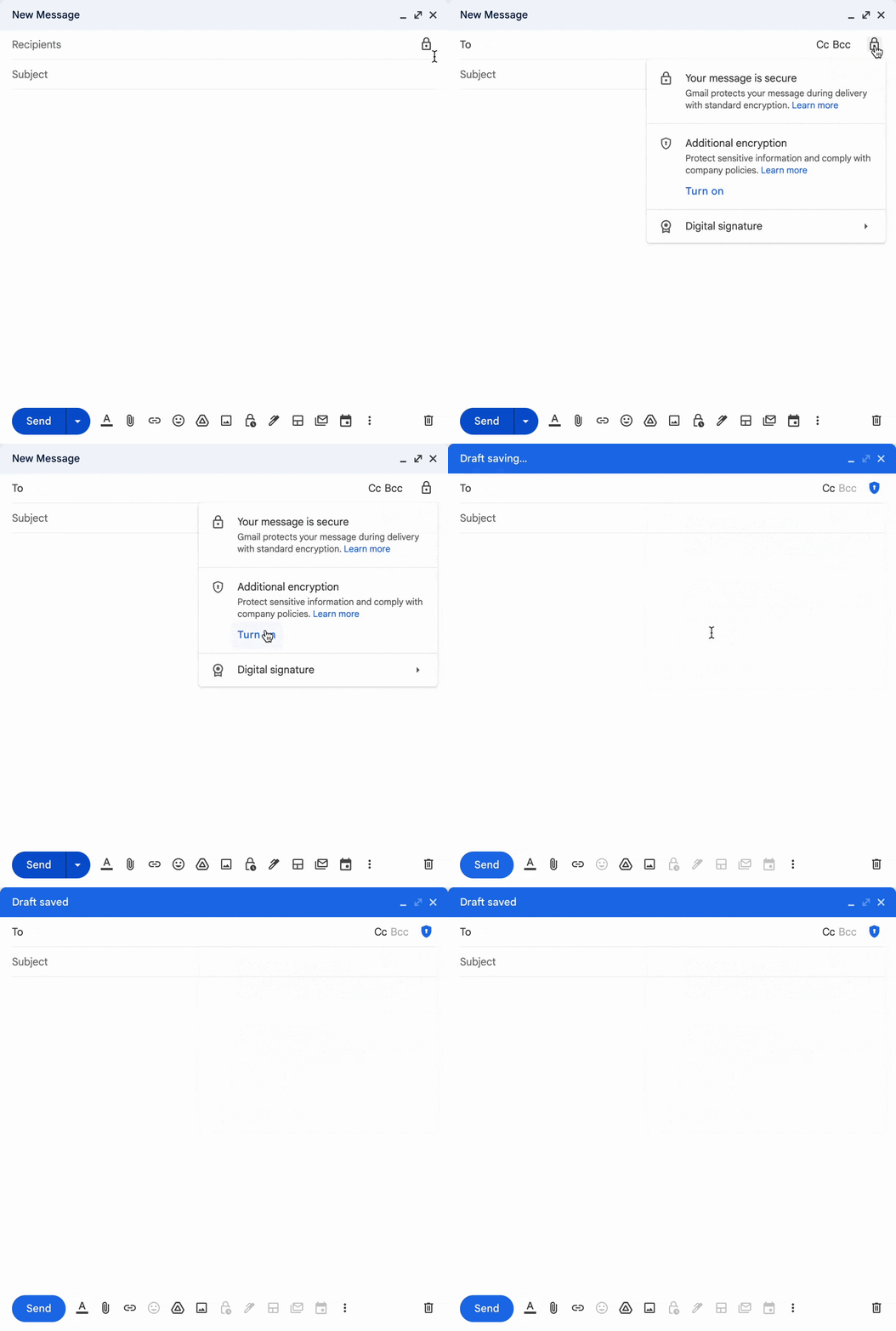
  • End users: Once enabled by your Workspace admin, to add client-side encryption to any message, click the lock icon and select additional encryption, and compose your message and add attachments as normal. 

Rollout pace 


Availability 

  • Available to Google Workspace Enterprise Plus, Education Plus, and Education Standard customers 
  • Not available to Google Workspace Essentials, Business Starter, Business Standard, Business Plus, Enterprise Essentials, Education Fundamentals, Frontline, and Nonprofits, as well as legacy G Suite Basic and Business customers 
  • Not available to users with personal Google Accounts 

Resources

Quick summary 

To limit distractions during meetings, Google Meet offers noise cancellation to filter out background noises such as a closing door or the sounds of a nearby construction site. Beginning today, noise cancellation is: 
  • Available for users with personal Google Accounts on a wider variety of Android mobile devices. 
  • Available for Google Workspace Business Starter, Education Fundamentals, Education Standard customers. 
  • Enabled by default for third-party devices that connect to Meet using Pexip 

Expanding this functionality helps make calls more productive by reducing distractions across a wider variety of devices. 

Getting started 

  • Admins: 
  • End users: 
    • Visit the Help Center to learn more about turning filtering out noise from your meeting on Google Meet.
    • If you’re joining using a Workspace account, the meeting host's Workspace edition will determine the default state. You can turn the feature on or off from the settings menu. 
    • If you’re joining a meeting on an Android device with your personal Google Account, noise cancellation is OFF by default. 

Rollout pace 


Resources