Note: This blog post outlines upcoming changes to Google Currents for Workspace users. For information on the previous deprecation of Google+ for users with personal Google accounts, please see this post.
What's Changing
Last year, we announced plans to wind down Currents, to focus efforts on community experiences that are better integrated with the rest of Google Workspace. To help our customers manage this transition, we published detailed guidance for Workspace administrators and enabled customers to opt-in for automated migration of Currents data to spaces in Google Chat.
We are nearing the end of this transition. Beginning July 5, 2023, Currents will no longer be available. Workspace administrators can export Currents data using Takeout before August 8, 2023. Beginning August 8th, Currents data will no longer be available for download.
Although we are saying goodbye to Currents, we continue to invest in new features for Google Chat, so teams can connect and collaborate with a shared sense of belonging. Over the last year, we've delivered features designed to support community engagement at scale, and will continue to deliver more. Here is a summary of the features with additional details below:
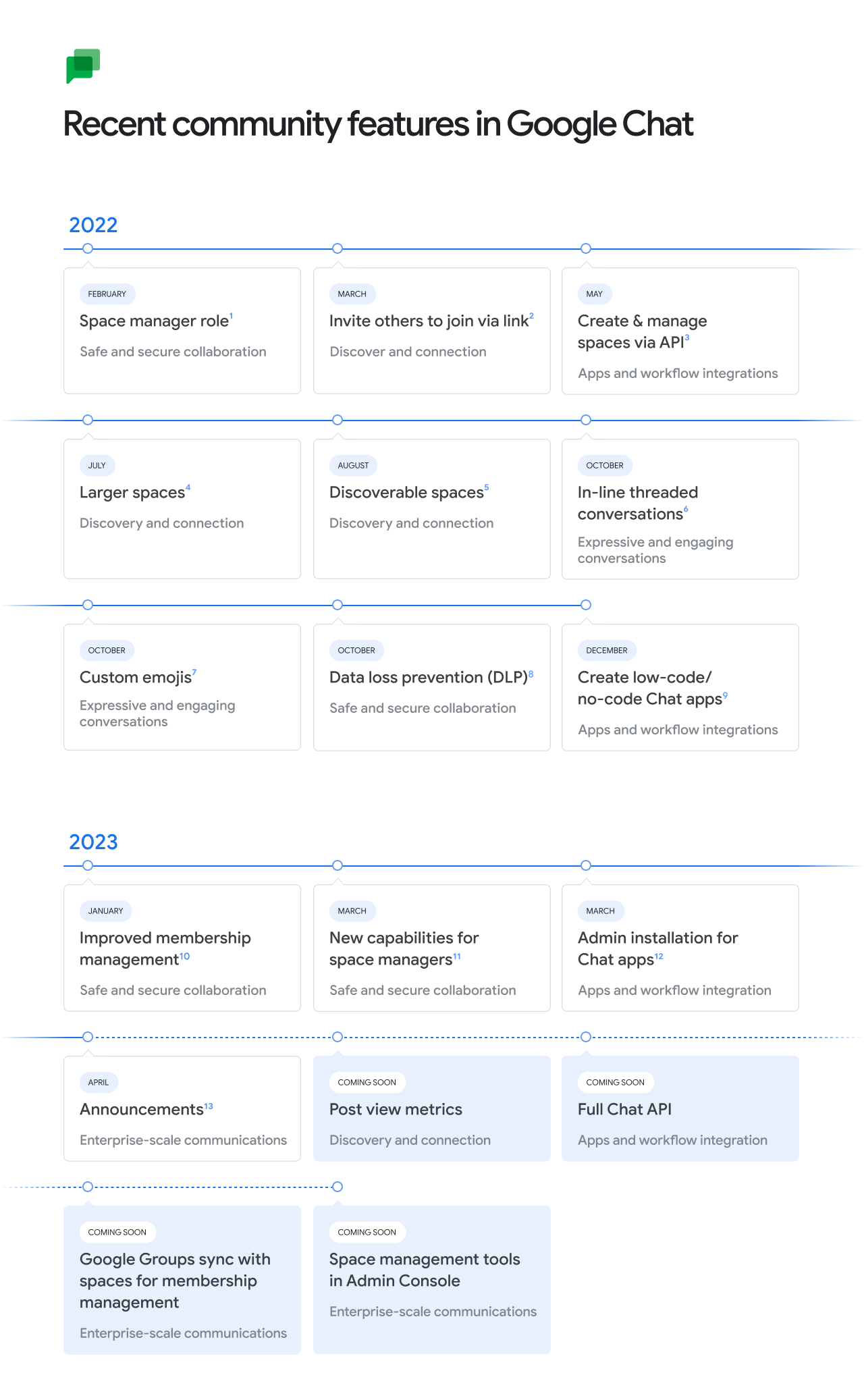
This month, we’re enabling new ways for organizations to share information across the enterprise with announcements in Google Chat. This gives admin controls to limit permissions for posting in a space, while enabling all members to read and react, helping ensure that important updates stay visible and relevant. Later this year, we plan to simplify membership management by integrating Google Groups with spaces in Chat, enable post-level metrics for announcements, and provide tools for Workspace administrators to manage spaces across their domain.
Announcements in Google Chat
Managing space membership with Google Groups
We’ve already rolled out new ways to make conversations more expressive and engaging such as in-line threading to enable rich exploration of a specific topic without overtaking the main conversation and custom emojis to enable fun, personal expression.
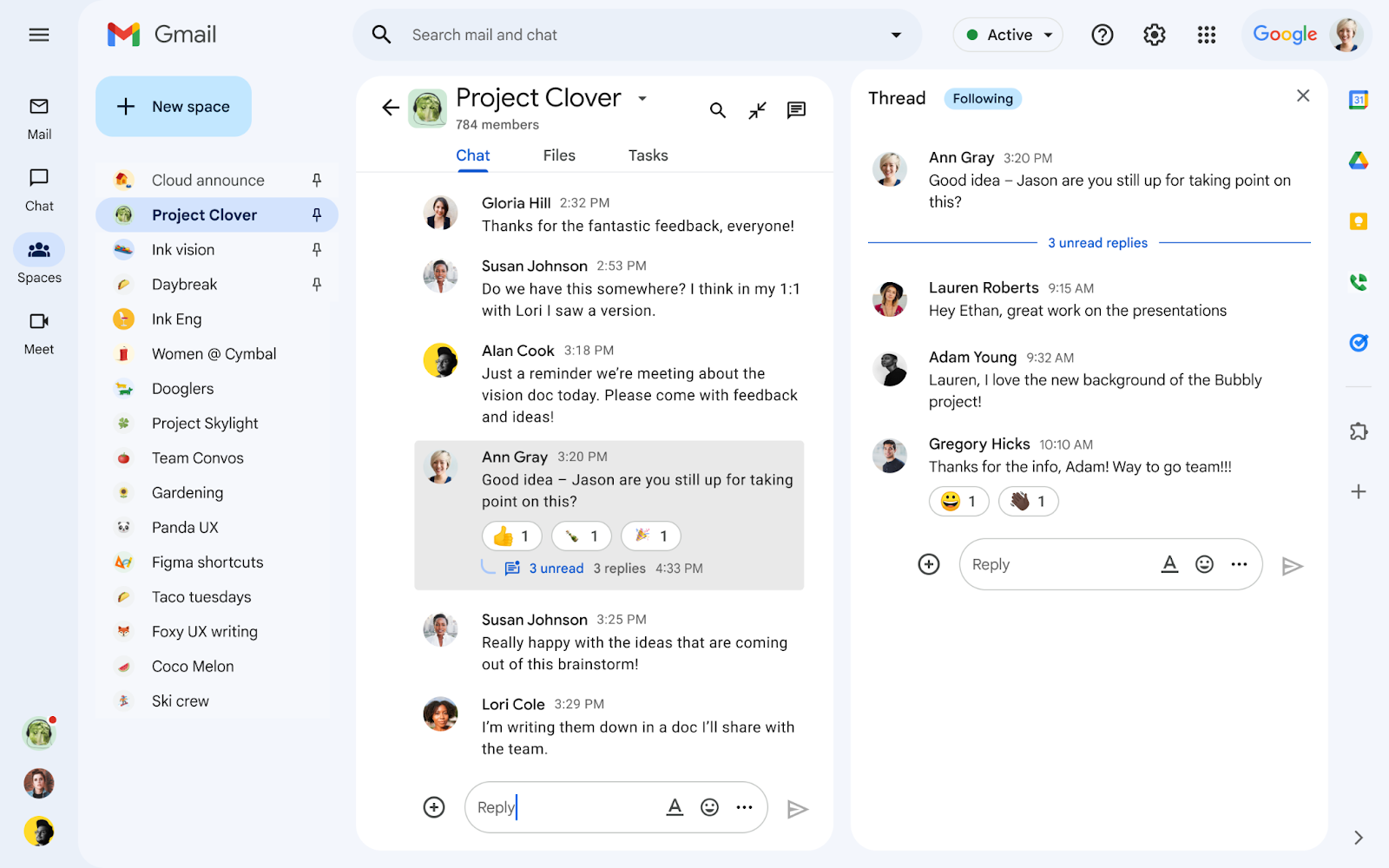
In-line threaded conversations
Discover and join communities with up to 8,000 members
We’ve also made it easier for individuals to discover and join communities of shared interest. By searching in Gmail, users can explore a directory of available spaces covering topics of personal or professional interest such as gardening, pets, career development, fitness, cultural identity, and more, with the ability to invite others to join via link. Last year, we increased the size of communities supported by spaces in Chat to 8,000 members, and we are working to scale this in a meaningful way later this year.
A directory of spaces in Google Chat for users to join.
As communities grow, it’s essential to provide tools for content moderation and data management. Last year, we introduced space managers, a community lead with abilities to moderate conversation and manage membership, and last year at NEXT, we rolled out data loss prevention (DLP) for Chat. We will continue to enhance community health and data security for Google Chat.
Our partner community is extending the power of Chat through integrations with essential third-party apps such as Jira, GitHub, Asana, PagerDuty, Zendesk and Salesforce. Many organizations have built custom workflow apps using low-code and no-code tools, and we anticipate that this number will continue to grow with the GA releases of the Chat API and AppSheet’s Chat app building capabilities later this year.
For teams to thrive in this rapidly changing era of hybrid work, it’s essential to build authentic personal connections and a strong sense of belonging, no matter when or where individuals work. We will continue to make Google Chat the best option for Workspace customers seeking to build a community and culture for hybrid teams, with much more to come later this year.
Who's impacted
Admins and end users
Why it’s important
The transition from Currents to spaces in Google Chat removes a separate, siloed destination and provides organizations with a modern, enterprise-grade experience that reflects how the world is working today. Google Workspace customers use Google Chat to communicate about projects, share organizational updates, and build community.
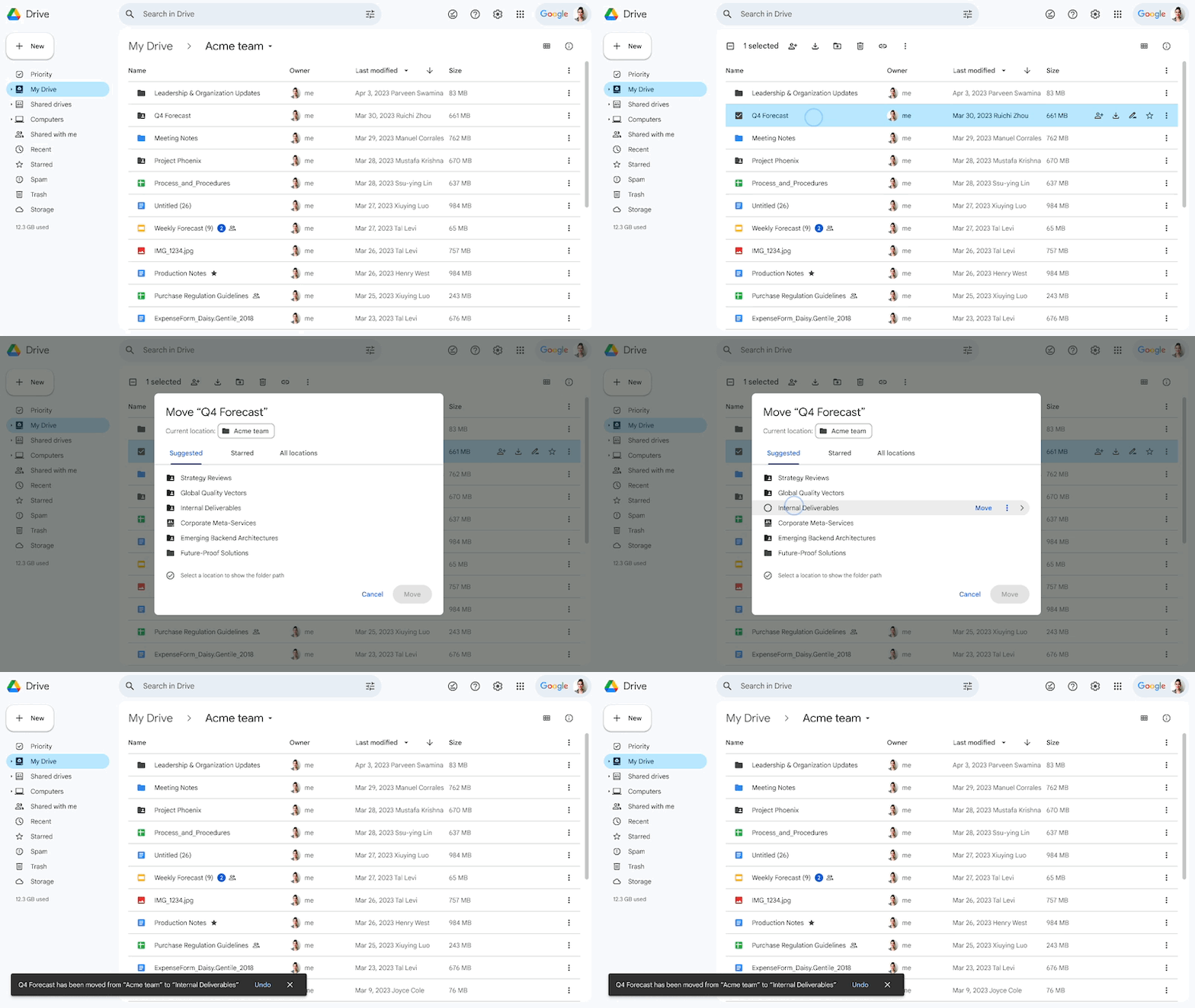
We’re introducing improvements to the web Google Drive location picker that enable you to quickly and efficiently select a location to organize files and folders. The updates include a new visual experience and helpful suggestions when moving files and folders or adding shortcuts to items in Drive. Specifically you’ll notice:
“Suggested”, “Starred”, and “All locations” tabs. Upon navigating into a folder location, the tabs are replaced by a back button and the name of the location
Details for the selected folder paths, an option to create a new folder, and an image notification if you’re moving something into an empty folder
Suggested locations and the option to reject the suggestion, which immediately removes it from the list
Streamlined navigation that adds an inline button to complete the action of moving a file in one click
A label if a folder is “view only” and explanations for why you might face an error when moving a file, such as not being the owner of a file
Who’s impacted
End users
Why it’s important
This update improves upon the current Drive picker experience, allowing you to organize files, folders, and shortcuts in Drive in a more effective manner.
Getting started
Admins: There is no admin control for this feature.
Last year, we announced a beta for a new tool in Google Classroom called practice sets. Educators can transform new and existing content into engaging and interactive assignments. With autograding built in, teachers can receive performance insights and snapshots into student progress.
Students get real-time feedback as they complete practice sets, so they know whether they’re on the right track. If they get stuck and need support, they can see automated hints and video suggestions, which are selected based on a learning skill added by the teacher.
We’re excited to announce that practice sets are now generally available in English in Google Classroom to Google Workspace for Education Plus and Google Workspace for Education Teaching and Learning customers.
Who’s impacted
Admins and end users
Why you’d use it
While every student learns in their own way, practice and specific feedback can help them learn more effectively. Assignments can be completed with a variety of tools for input, such as a mouse, stylus, touchpad, or math keyboard depending on how a student works best. With practice sets, educators can more easily get insight into which concepts need more instruction time and when to move on, giving them performance trends and insights to shape future lesson plans.
Visit the Teacher Center to learn more about practice sets via our online course.
Additional details
A key part of teacher workflows is sharing their content. Now, teachers can share practice sets with verified teachers in their Google Workspace, and leverage one another's curriculum with their own students. Speak to your admin to become a verified teacher.
Getting started
Admins: Practice sets are enabled by default, but admins need to add teachers to the verified teacher group in order for them to receive a shared practice set from other teachers in their Google Workspace.
End users: To access practice sets, go to Google Classroom > Practice sets > Create (or practicesets.classroom.google.com). Visit the Help Center to learn more about Practice sets.
Rollout pace
This feature is now available.
Availability
Available to Google Workspace for Education Plus and Google Workspace for Education Teaching and Learning Upgrade
Not available to Google Workspace Essentials, Business Starter, Business Standard, Business Plus, Enterprise Essentials, Education Standard, Enterprise Plus, Education Fundamentals, Frontline, and Nonprofits, as well as legacy G Suite Basic and Business customers
Not available to users with personal Google Accounts
Last year, we made numerous improvements to Google Sites, including the addition of a spacer option, a density theme setting, and stylized social media links. Today, we’re announcing even more enhancements that improve upon collaboration within Sites and give you even more control over the layout of your Site’s content.
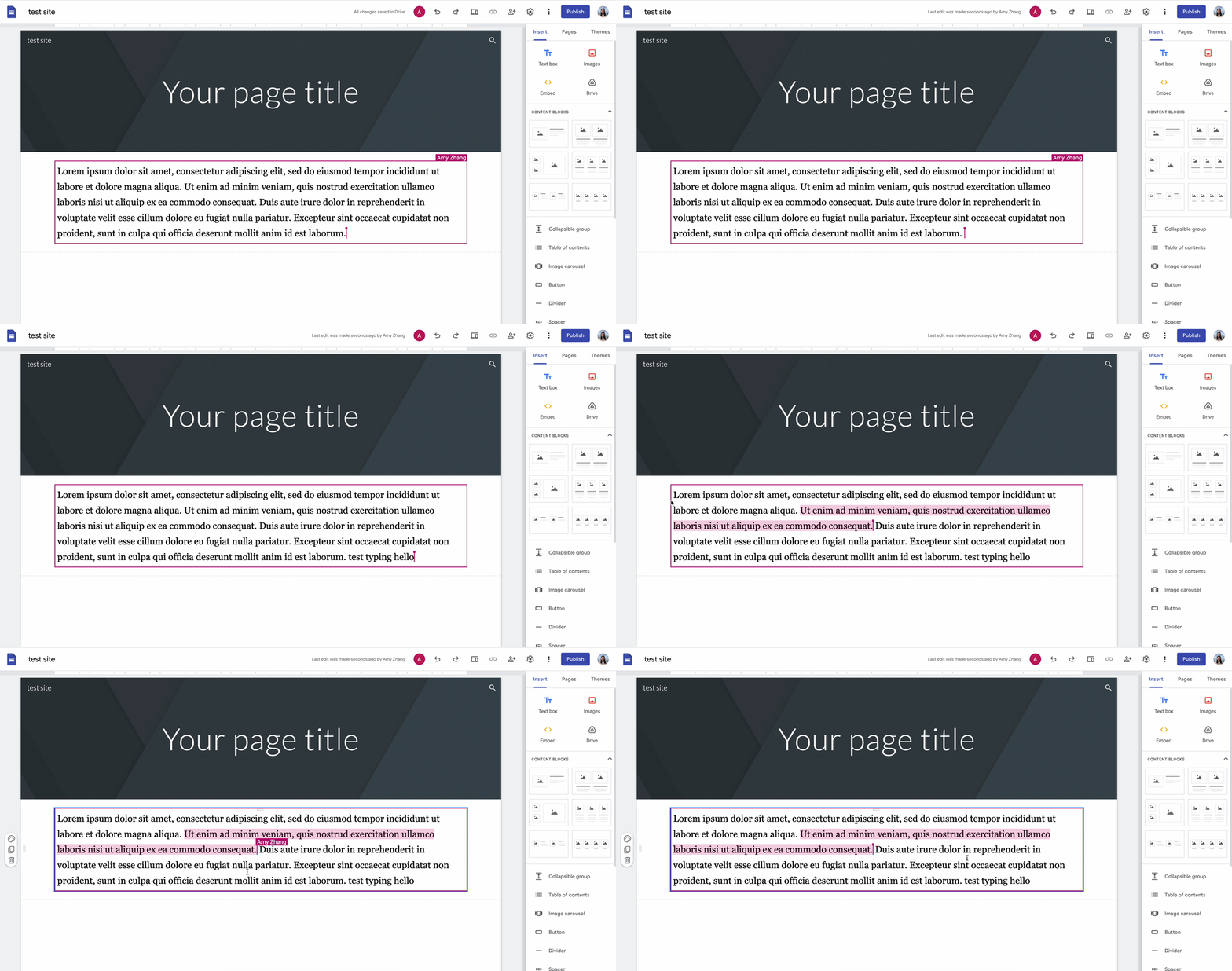
New collaborators’ cursors will appear when Site editors are typing within a text tile. This will help you and others know who is working on what while in edit mode of a Site.
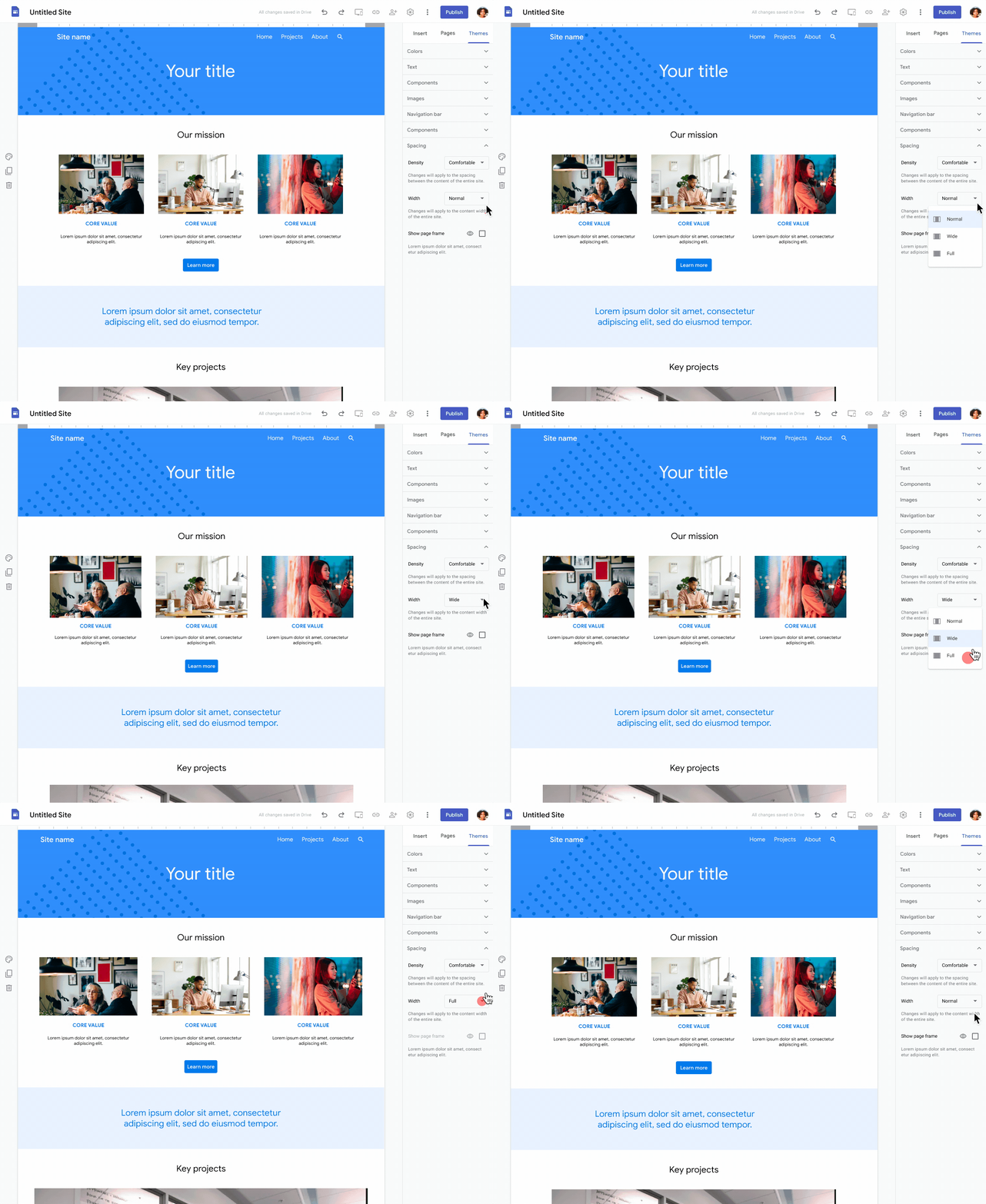
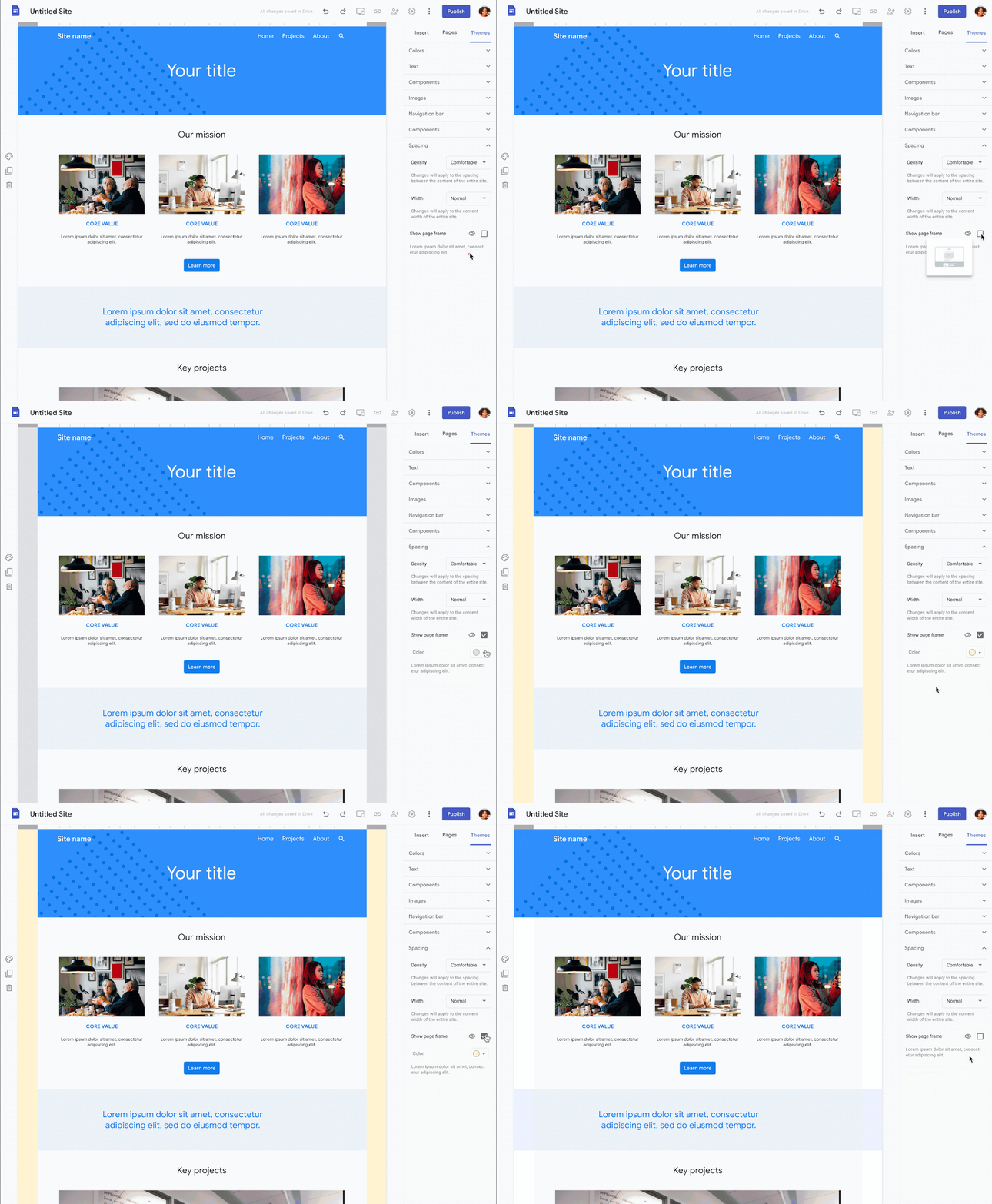
Display your content with more flexibility by adding page frames and adjusting your Site width for desktop viewing within custom themes. Page frame colors are customizable and width options include:
Normal (Default): Designed for more spread out Sites with less content
Full: Designed for dense, content-heavy Sites
Wide: Designed for Sites that fall between normal and full
Set a Site width:
Enable page frames:
Lastly, we’re adding alignment options to buttons, allowing you to align buttons left, center, or right within a group. Aligned buttons shrink to fit their text, allowing a button to be narrower than the group containing it.
Getting started
Admins: There is no admin control for this feature.
End users:
Collaborators’ cursors will appear automatically in Site edit mode.
To adjust the width of a Site or add a page frame, navigate to Themes > Custom > Edit > Spacing > Width > and/or Show page frame. Visit the Help Center to learn more about creating a custom theme.
To align a button, navigate to the Insert menu and insert a button. Drag and drop a button to the appropriate section in the Site and choose the alignment option that best works for your Site.
In 2022, we introduced Access Approvals, which enables customers to control when Google support personnel can access specific data during support and general maintenance. Beginning today, we’re introducing additional options that provide customers even more control over these data interactions:
Specify: Google support personnel can indicate which specific product data they need access to - for example: Gmail data only, instead of all Workspace Data.
Access duration: Specify a time limit wherein data can be accessed.
Control: Revoke previously granted access if no longer applicable.
Context: Denote the reason an access request was approved or denied, or why a previously approved request was revoked, to streamline the process for future requests.
Who’s impacted
Admins
Why it’s important
We know it’s essential that our customers have visibility and control over their systems and data and how they’re accessed by any third party, including Google. Introducing additional controls for our customers helps ensure that their data is accessed in an explicitly consensual manner that best suits the needs of their business.
Access Approvals is part of Google Workspace Assured Controls, which is available as an add-on for Google Workspace Enterprise Plus customers only. For more information, contact your Google account representative.
In the Google Cloud Community, discuss the latest features with Googlers and other Google Workspace admins like you. Learn tips and tricks that will make your work and life easier. Be the first to know what's happening with Google Workspace.
On the “What’s new in Google Workspace?” Help Center page, learn about new products and features launching in Google Workspace, including smaller changes that haven’t been announced on the Google Workspace Updates blog.
Discover how a diverse range of organizations, from small businesses and nimble startups to globally recognized Fortune 500 corporations, leverage the collaborative power of Google Workspace. Explore examples of how teams of are streamlining workflows and driving productivity by utilizing Google-Workspace.